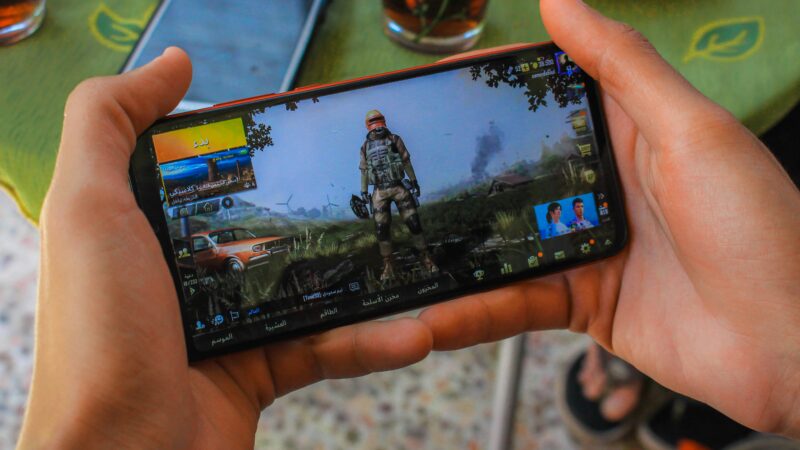
Picture this. You find a phone with a powerful chipset, a 120 Hz display, and a huge battery. The spec sheet looks perfect, so you buy it.
Then you open BGMI, play for 20 minutes, and the FPS starts dropping. The phone is warm, then hot. And you’re left thinking, “But the specs were so good.”
This happens to a lot of people. Specs tell you what a phone could do, not what it will do after half an hour of real gameplay. In this guide, I’ll walk you through the exact process I use to judge a gaming phone. You don’t need to know anything about processors or GPUs.
I’ve also made a video on this topic in Hindi. If you’d prefer to watch it, you can find it on my YouTube channel.
Table of Contents
1. Start with the game you actually play
This sounds obvious, but everything else depends on it.
If you mainly play competitive games like BGMI or COD Mobile, you need high and stable FPS. If you play something heavy like Genshin Impact, the graphics load on the phone is much bigger.
So judge the phone against your game, not against a spec sheet.
2. Find the exact chipset model
Don’t stop at “Snapdragon” or “Dimensity.” Both brands make chips at very different performance levels.
If a listing only says “Snapdragon processor,” that tells you almost nothing. If it says Snapdragon 8s Gen 3, now you have a specific model to research. (I’m using this chip as an example. Use whichever chipset your phone has.)
Then search for it with your game, like this:
- “Snapdragon 8s Gen 3 BGMI FPS test”
- “Snapdragon 8s Gen 3 COD Mobile FPS test”
That shows you how the chip performs in a real game. Don’t guess performance from a chipset name. It depends on the exact chip, the phone’s cooling and the software tuning, all three.
3. Display Hz and game FPS are not the same thing
A 144Hz display doesn’t mean you’ll get 144 FPS. Hz only tells you how many times per second the screen can refresh.
To actually get 144 FPS, three things have to line up:
- The game must support a 144 FPS mode
- The phone must be able to run it
- The phone must be able to hold it
So check whether your game offers 90 or 120 FPS, and whether the phone supports that option.
4. Stable FPS beats highest FPS
Say a phone gives you 90 FPS when the game starts, but after 20 to 30 minutes it keeps dropping. You didn’t really get 90 FPS. You got it for the first few minutes.
When you watch reviews, don’t just look at the peak number. Look at how stable the FPS stayed over a long session, and how many frame drops there were.
Take two phones. One hits very high FPS briefly but keeps dipping. The other runs slightly lower FPS and holds it. The second one will usually feel smoother and more predictable to play on.
5. Cooling: judge the result, not the spec
During gaming, the CPU and GPU work non-stop and produce heat. If the phone can’t manage that heat, it slows itself down to cool off.
A vapor chamber or other dedicated cooling is a good sign. But don’t assume a big vapor chamber means the phone won’t heat up. What matters is how well performance holds up as the temperature rises. Read the cooling spec, but make your final call from a sustained gaming test.
6. 144Hz isn’t automatically better than 120Hz
High refresh rate helps in gaming. 90Hz, 120Hz and 144Hz all make supported content look smoother.
But if your game tops out at 120 FPS, the extra headroom of a 144Hz screen won’t help you in every situation. So don’t assume one phone is the better gaming phone just because its display number is higher.
7. Touch response
Smooth visuals aren’t enough. When you aim, shoot or move, the phone has to register your touch quickly.
Boxes love to advertise “480Hz touch sampling,” but don’t rely on that number alone. Look for independent gaming tests that talk about how the touch actually feels in play.
If you’re a casual gamer, this matters less. If you play competitively, take it seriously.
8. Battery and charging
A big battery is useful, but the mAh number alone doesn’t tell you much. What you want to know is how much battery the phone loses in a fixed gaming session. Some tests measure exactly this.
Also look for bypass charging. If you often game with the charger plugged in, it’s a very handy feature.
9. RAM and storage
You don’t need to chase the biggest RAM number. Just make sure it’s enough for your gaming and daily use.
Don’t ignore storage, though. If you keep several large games, save recordings, and plan to use the phone for years, a higher storage variant makes sense. Ask yourself: “How many games will I keep on this phone, and for how many years will I use it?”
10. How good is the phone outside gaming?
People forget this one. You won’t only game on this phone. You’ll take photos, make calls, scroll social media and store videos.
Some gaming-focused phones put performance first and compromise on the camera or USB connectivity. If you’re fine with that, great. But if you want strong gaming and a good camera and everyday experience in one phone, check those areas before you decide.
Bonus: future headroom. If you plan to keep the phone for 3 to 4 years, don’t only ask whether it runs today’s games. Games get more demanding over time, so buying a bit more performance than you need today is a sensible move.
The whole process in one checklist
- Decide your main game
- Identify the exact chipset
- Check real FPS tests for that chipset and game
- Check FPS stability in long sessions
- Look at the cooling
- Match display refresh rate with the game’s FPS support
- If you play competitively, check touch response
- Check gaming battery drain and charging features
- Pick RAM and storage that fit your usage
- Decide whether the phone’s limits outside gaming are acceptable
No single spec decides a gaming phone. Look at the whole chain:
Exact chipset → your game → real FPS → long-session stability → cooling → display and touch → battery → storage → daily use.
When that chain fits your needs, that’s a genuinely good gaming phone for you.
Frequently asked questions (How to Choose a Gaming Phone)
Does a 144Hz display mean 144 FPS gaming?
No. The game has to support 144 FPS, and the phone has to run and sustain it.
Is Snapdragon better than Dimensity for gaming?
Not by default. Both brands make chips at different performance levels. Check the exact chipset in real game tests.
What matters more, peak FPS or stable FPS?
Stable FPS. A phone that holds a slightly lower frame rate all session usually feels better than one that spikes high and then drops.
Does a bigger battery always mean longer gaming time?
No. Check how much battery a phone loses in a fixed gaming session instead of relying on the mAh figure.
How much RAM and storage do I need for gaming?
Get enough RAM for your games and daily use, without chasing the biggest number. For storage, consider how many large games you’ll install and how long you’ll keep the phone.