Last Updated - June 2, 2026 02:41 am IST | Dhiraj Singh
If you’re expecting a government subsidy—whether it’s for LPG, a scholarship, or a farmer’s benefit, Yuva Sathi (West Bengal)—and it hasn’t arrived, there is likely one simple hurdle: DBT is not enabled.
Direct Benefit Transfer (DBT) ensures money goes straight to you, but your bank needs to “handshake” with the government’s system first. The good news? You can start this process in about 2 minutes using just your phone. Let’s Dive into How to Enable DBT Link in Your Bank Account.
Table of Contents
What is DBT and Why the Rush?
DBT is the government’s way of cutting out the middleman. By linking your Aadhaar to your bank account via the NPCI (National Payments Corporation of India) mapper, subsidies are sent directly to your primary account. Without this “seeding,” the money has nowhere to go.
Step-by-Step: Enable DBT in 2 Minutes
Most people think they need to stand in a long queue at the bank. In reality, you can initiate the request through your bank’s mobile app or the NPCI’s own portal.
Method 1: Using the NPCI Portal Bharat Aadhaar Seeding Enabler (BASE)
- Confirmation: Once the details are verified, your request is submitted directly to the NPCI mapper.
- Visit the Official Site: Go to the NPCI Aadhar link bank account status check.
- Locate the Consumer Tab: Click on the ‘Consumer’ menu located on the top navigation bar.
- Open BASE: From the dropdown, select ‘Bharat Aadhaar Seeding Enabler (BASE)’.
- Enter Your Details: You will be prompted to provide:
- Submit Request Type: Choose whether you are performing a fresh seeding or transferring your DBT from a previous bank.
- Verify with OTP: * Enter the OTP sent to your Aadhaar-linked mobile number. (You may also receive a second OTP from your bank to confirm the mapping.)
- Confirmation: Once the details are verified, your request is submitted directly to the NPCI mapper.
Note: Sometimes, the NPCI system may experience downtime due to server issues. If you encounter this, try accessing it again at night.
Method 2: Using Your Bank’s Mobile App
- Login: Open your bank’s official app (SBI, HDFC, ICICI, etc.).
- Find ‘Service Requests’: Look for a section called “Service Requests,” “Account Services,” or “Insta Services.”
- Select Aadhaar Seeding: Click on “Link Aadhaar for DBT” or “Aadhaar Seeding.”
- Confirm Details: Enter your 12-digit Aadhaar number and select the account you want to use for DBT.
- Verify: Enter the OTP sent to your Aadhaar-linked mobile number.
How to Check Your Status
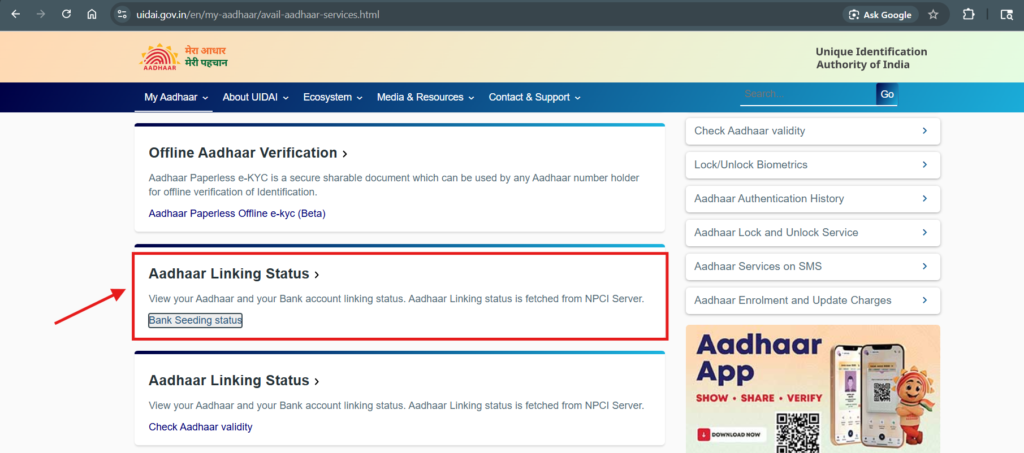
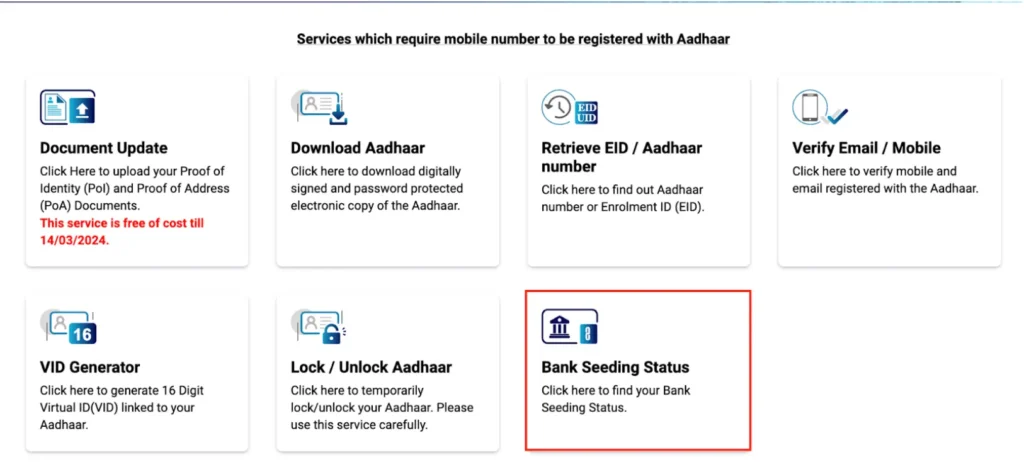
Once you’ve done the above steps, go to the UIDAI portal or mAadhar App. Enter your Aadhaar number to see which bank is currently “Active” for DBT.
Through the UIDAI Portal or mAadhar:
The Reality Check: How long does it actually take?
While it only takes 2 minutes to submit your request, the digital pipes need a little time to sync.
- Request Submission: Instant (2 Minutes).
- NPCI Mapper Update: It can take a few minutes to 2 working days for the status to officially change on the government portal.
- Bank Processing: Usually 24 to 48 hours.
Pro Tip: Don’t worry if it doesn’t show “Enabled” immediately. Give it a few days, then check your status on the official UIDAI or NPCI website.
Summary
Enabling DBT is the final step to ensuring your financial benefits are secure. It’s a 2-minute “set it and forget it” task that saves you a lot of headache down the road.
FAQ – How to Enable DBT in Your Bank Account
1. Is “Aadhaar Linking” the same as “DBT Seeding”?
Not quite. Linking just means your bank has your Aadhaar number on file for KYC. Seeding (or DBT enabling) means your bank has specifically notified the NPCI mapper to send all your government subsidies to that specific account. You can link Aadhaar to five accounts, but you can only seed it to one.
2. I have three bank accounts. Which one will get the money?
The money will always go to the last account you successfully seeded for DBT. If you recently moved your DBT from SBI to HDFC using the BASE portal, HDFC will become your active account for all future benefits.
3. How will I know when the money is credited?
If you have SMS alerts enabled with your bank, you’ll get a notification the moment the “DBT Fund” hits your account. You can also check your balance via your bank’s app or an ATM.
4. My name on Aadhaar is “Raj K. Sharma” but my bank account says “Raj Kumar Sharma.” Will it work?
A mismatch in name spelling is a very common reason for DBT failure. If the names don’t match exactly, the NPCI system might reject the link. If this happens, you should first update your name at an Aadhaar Enrolment Centre or your bank branch.
5. How long do I have to wait after applying?
While the application takes only 2 minutes, the backend process usually takes 24 hours to 48 hours to reflect on the NPCI mapper. Nowadays, it’s processed in minutes. You can check the status on the Aadhar Portal.
6. Can I disable DBT if I don’t want it?
Yes. You can use the same BASE portal or visit your bank to “De-seed” your account if you no longer wish to receive benefits through that specific bank.