If you own a Samsung Galaxy S25 FE, your phone just got a massive performance and feature injection. Samsung has officially started rolling out the One UI 8.5 update, a hefty 3.5 GB download built on top of Android 16.
Having tested this update side-by-side with the top-tier Galaxy S26 Ultra, the most surprising takeaway isn’t just that the S25 FE handles the software smoothly—it’s how many premium flagship features have trickled down to this sub-flagship device. Samsung has introduced its sophisticated “Liquid Glass” design language here, giving the UI softer depth effects, floating menu elements, and cleaner transitions that make the phone feel significantly more premium.
While the changelog highlights the major visual overhauls, the real value lies in the smaller, unheralded changes. Here are 7 One UI 8.5 hidden features Samsung tucked into this update that completely alter the daily user experience, along with a few things that didn’t quite make the cut.
1. Real-Time Audio Eraser in the Quick Menu
One UI 8.5
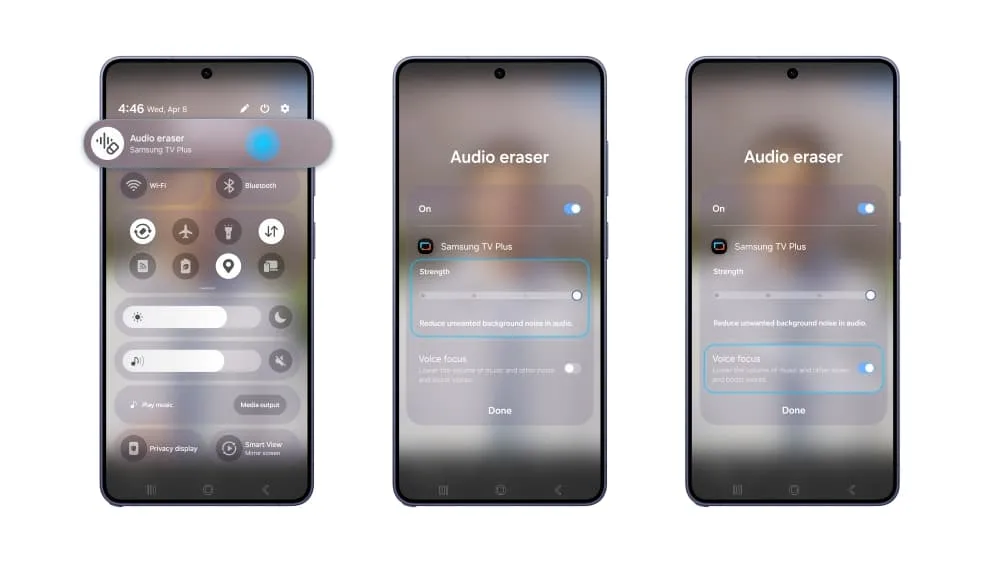
We’ve had AI audio tools in post-processing for a while, but One UI 8.5 makes the Galaxy S26 Ultra’s real-time Audio Eraser available right from the notification shade.
If you are scrolling through Instagram Reels, Facebook, or watching a YouTube video where the background music is deafening or the ambient noise drowns out the speaker, you no longer have to squint your ears. Pull down the quick menu, toggle Audio Eraser, and adjust the intensity slider. The on-device AI isolates human speech and suppresses background chaos instantly while the video is playing. It’s an incredibly practical feature for noisy commutes or casual media consumption.
2. Granular Quick Panel Fluid Customization
One UI 8.5
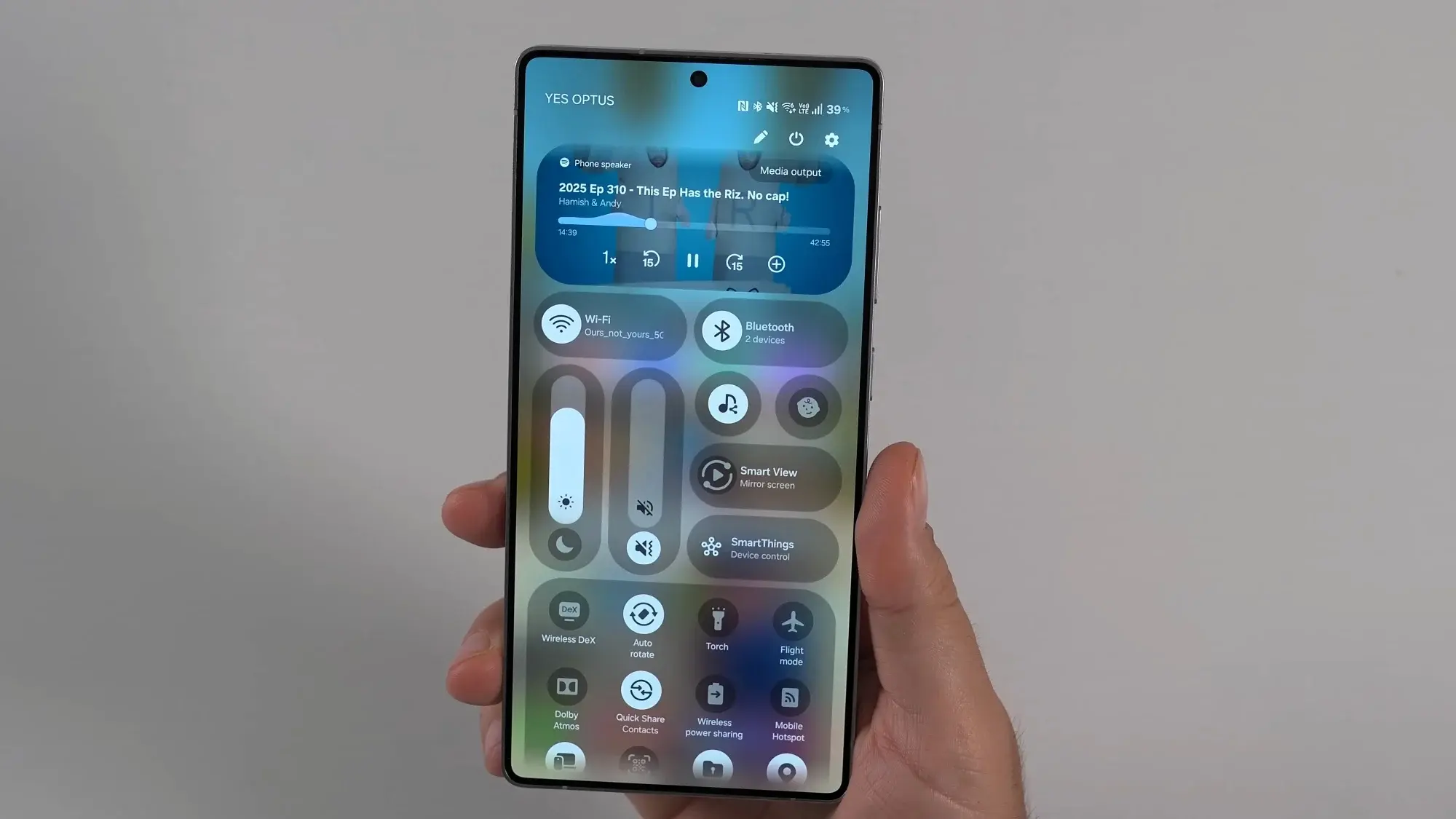
The Quick Settings panel has been completely reimagined to break away from the rigid grids of older software. If you enjoy tailoring your desktop or home screen, you can now fully customize the Quick Panel without needing third-party modules.
- Shape Shifting: Turn traditional pill-shaped toggles into compact circles or larger tiles.
- Resizing Controls: Drag handles to make specific toggles larger for easier access.
- Vertical Sliders: The brightness and volume sliders can now be flipped into portrait orientation, allowing you to arrange your most-used controls exactly where your thumb naturally rests.
The update fixes the awkward spacing issues of One UI 8.0, offering a truly fluid layout.
3. Persistent Photo Edit History via Creative Studio
One UI 8.5
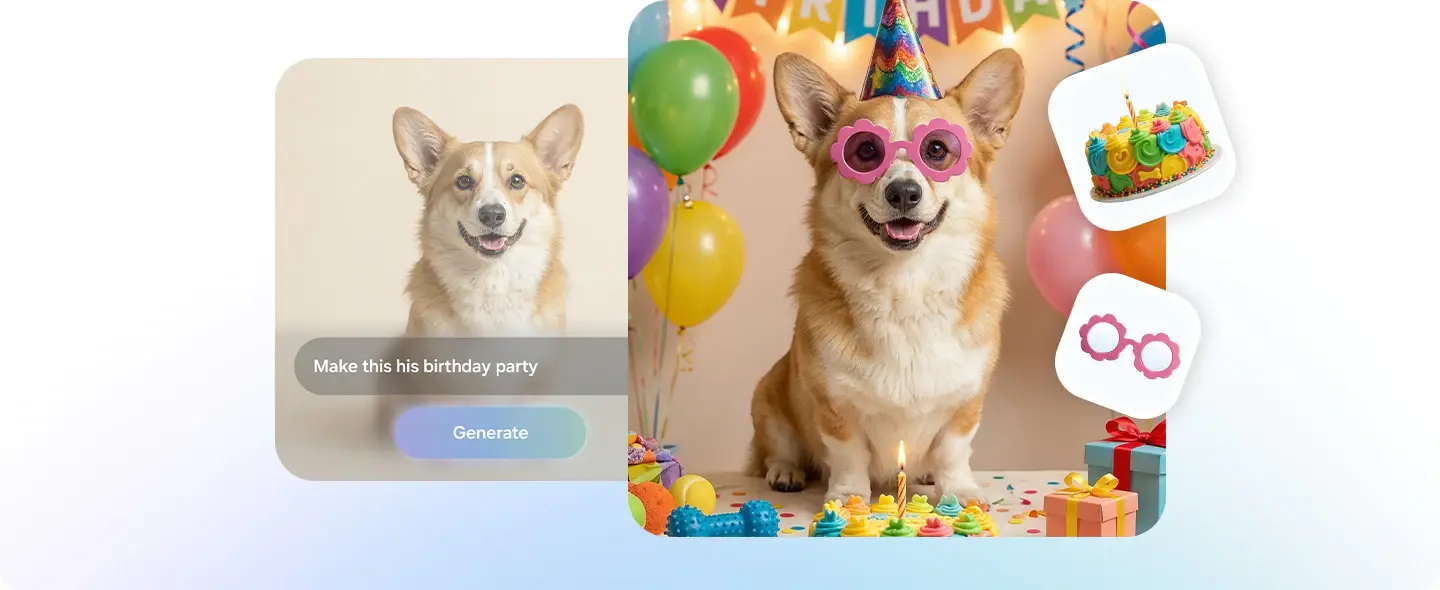
Previously, editing a photo with Galaxy AI meant that once you saved a change, your only fallback was reverting entirely to the original image. One UI 8.5 integrates the new Creative Studio pipeline into the stock Gallery app, introducing deep version tracking.
When you apply advanced edits—like moving objects, changing a daytime scene to twilight, or erasing reflections—the phone logs your edit history. You can open a photo days later, review the step-by-step changes you made, and jump back to a middle iteration without losing all your subsequent work.
4. Ecosystem-Wide “Storage Share”
One UI 8.5
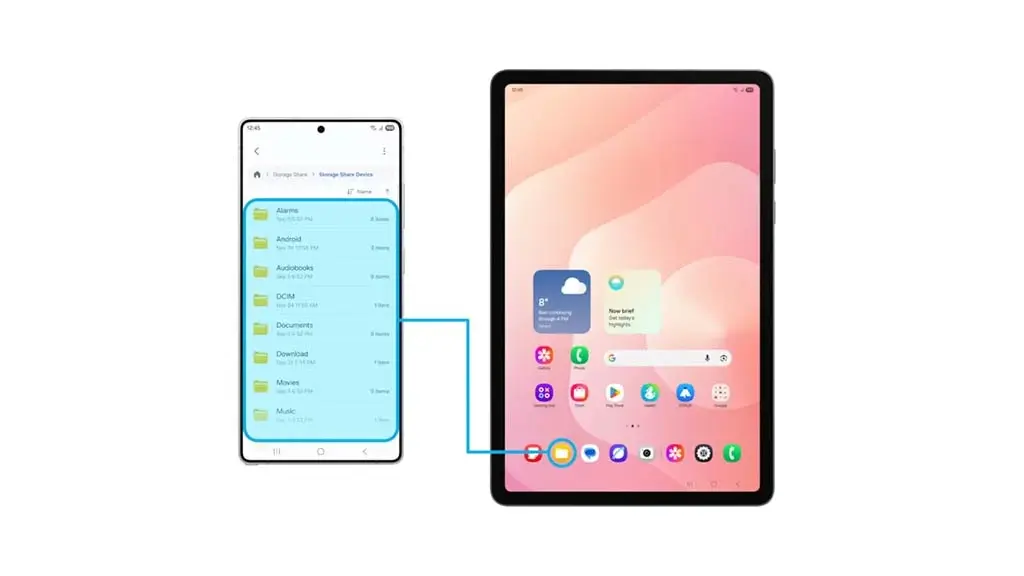
Hidden deep within the revamped My Files application is a tool called Storage Share.
[Your Galaxy S25 FE] <--- (Encrypted local sync) ---> [Galaxy Tab / Book / Samsung TV]
When enabled, as long as your other Samsung devices (tablets, laptops, or even compatible smart TVs) are logged into the same Samsung Account, you can browse, open, and pull files from those devices directly through your phone’s file manager. There’s no need to physically grab your tablet from across the room or initiate a slow manual transfer—the storage volumes populate right inside the app like a localized cloud drive.
5. System-Wide On-Device Text Indexing
Finding local files on older software often felt useless unless you knew the exact filename. In One UI 8.5, if you head to the file manager, tap the three dots, and enter Search Settings, you will find a toggle labeled “Turn on all file access.”
Once activated, your phone uses the on-device NPU to build a deep visual and textual index of your local storage. It scans:
- Text hidden inside PDF and Word documents
- Data values in Excel sheets
- Receipts, screenshots, and photos containing text
If you have a digital receipt buried in your downloads folder, simply typing a store name or an invoice number into the file manager search bar pulls the exact file instantly.
6. Depth-Based 3D Live Effects
Samsung’s Live Effect tool used to apply a simple, generic zoom animation to static images. In One UI 8.5, opening a portrait or a clean photo in the Gallery and swiping up reveals a highly upgraded version of this feature.
The AI analyzes the scene, maps the foreground subject away from the background, and generates a dynamic depth layer. When you tilt your hardware in your hand, the image shifts responsively, mimicking the realistic 3D parallax look popularized by iOS.
Reviewer’s Note: While it looks fantastic on your screen, you cannot native-share this exact moving file to a non-Samsung user in its original format. To get around this, pair it with the new Partial Screen Recording feature in your quick toggles, record just the photo area while tilting your phone, and export a clean video file perfect for social media stories.
7. Carrier-Independent Direct Voicemail & Call Screening
One UI 8.5
The AI Call Screening feature has evolved significantly past basic text responses. When an unknown or suspected spam number dials in, you can tap Call Assistance to let an AI voice agent take the call for you. The agent asks the caller for their purpose and displays a live, running transcript on your screen so you can decide whether to pick up.
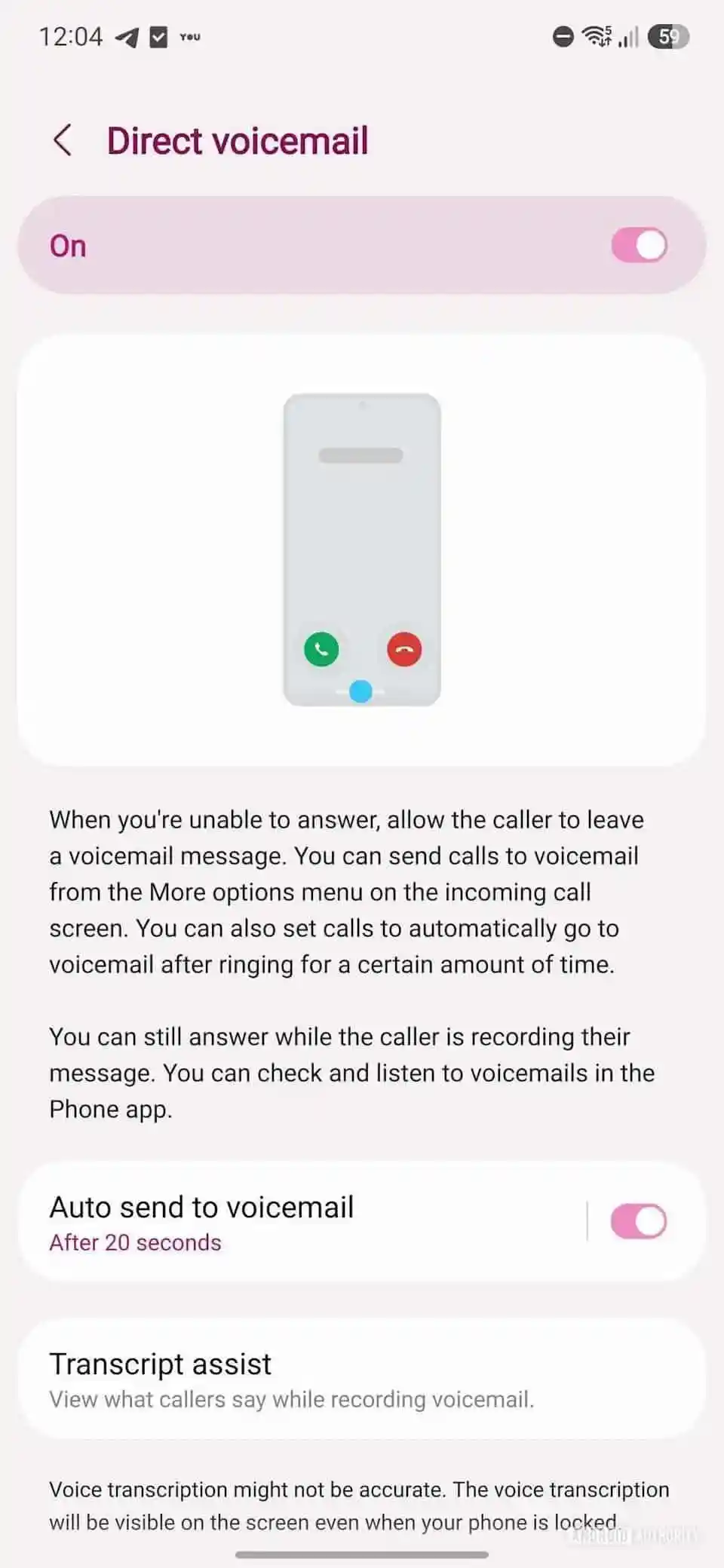
Complementing this is Direct Voicemail. If you go to Call Settings and turn on Auto Send Voicemail, you can set a custom ring duration (e.g., 5 or 10 seconds). If you don’t answer, the phone diverts the caller to a local voicemail prompt.
Unlike traditional carrier voicemails, this does not require service provider activation (like Jio or Airtel). It runs locally via Samsung’s software, recording the audio directly to your device and providing a live text transcription as the caller speaks.
The Catch: What’s Missing or Removed?
No update is perfect, and Samsung did make some intentional omissions to keep the S26 Ultra positioned as the definitive premium option:
- The S26 Ultra Exclusives: The highly-praised Horizon Lock video stabilization and the contextual Now Bar dashboard are completely absent here.
- The Unexplained Omission: Worryingly, opening the Camera app and checking the “More” tab reveals that Dual Video Recording has been completely removed. Why Samsung chose to ax a feature with clear casual vlogging utility is baffling, and we hope it gets patched back in a minor security update.
- Still No Native App Lock: Despite heavy customization upgrades, a native app lock remains missing from the stock UI, requiring users to rely on Secure Folder workarounds or third-party apps.
- No iOS Quick Share Bridge: Despite initial rumors of broader file sharing, Quick Share still lacks native cross-platform connectivity with Apple devices out of the box.
Real-World Usability & Value Analysis
At a massive 3.5 GB, you might worry about performance degradation on a Fan Edition phone. Fortunately, the optimization here feels tight. The “Liquid Glass” animations run at a locked, fluid refresh rate, and core actions like AI photo generation execute without causing noticeable thermal spikes.
| One UI 8.5 on Galaxy S25 FE | |
|---|---|
| PROS | CONS |
|
|
| Current Flipkart Deal Value: Excellent (~₹45,000) | |
With the S25 FE currently seeing steep discounts during online sales—dropping from its original ₹60,000 launch tag down to around ₹45,000 (and lower with card incentives)—this update drastically alters its value proposition. It effectively closes the software feature gap between the FE tier and the flagship Ultra line, making it one of the most balanced premium mid-rangers you can buy right now.
If you haven’t checked your settings app yet, head over to Settings > Software Update > Download and Install to pull down the patch.
One UI 8.5 Eligible Phones and Tablets: Is Your Device on the List?
Whenever a major mid-cycle point update drops, the biggest question is always: When is my device getting it?
The roadmap for One UI 8.5 is expected to follow the exact same structural eligibility footprint as the initial One UI 8 rollout. As a general rule of thumb, if your phone or tablet received the base Android 16 update, it is highly likely to transition to One UI 8.5. This covers every flagship Galaxy phone launched from 2022 onward, along with a wide array of mid-range and budget-tier hardware hitting shelves since 2023.
Keep in mind that for older legacy devices on this list, One UI 8.5 will serve as the final major feature and software update before shifting entirely to long-term security maintenance patches.
Below is the tentative, comprehensive device eligibility list for the One UI 8.5 rollout:
Galaxy S & Z Series (Flagships & Foldables)
| Galaxy S Series | Galaxy Z Series |
|---|---|
|
|
Galaxy A Series
| Modern Mid-Rangers (2024-2026) | Legacy & Budget Support |
|---|---|
|
|
Galaxy Tab Series
| Premium Tablets (Tab S) | Mass-Market & Budget Tabs |
|---|---|
|
|
Galaxy M, F, & XCover Series
| Galaxy M Series | Galaxy F Series | Galaxy XCover Series |
|---|---|---|
|
|
|
FAQ – One UI 8.5 Update
Q: What is the size of the One UI 8.5 update on the Galaxy S25 FE?
A: The stable One UI 8.5 update for the Samsung Galaxy S25 FE requires a download package of approximately 3.5 GB. Because it is a major upgrade built on top of Android 16 (specifically Android 16 QPR2), it is highly recommended to download the update over a stable Wi-Fi network and ensure your device has at least 50% battery remaining before installing.
Q: Did Samsung remove Dual Video Recording in One UI 8.5?
A: Yes. Following the One UI 8.5 update, the Dual Video Recording mode is completely missing from the “More” section within the stock Samsung Camera app. It is currently unclear if this omission is a temporary software bug or an intentional feature depreciation by Samsung. Users looking for a similar workaround will need to rely on third-party vlogging apps for the time being.
Q: Does the Galaxy S25 FE get the Horizon Lock feature in One UI 8.5?
A: No, the Horizon Lock video stabilization feature remains a hardware-bound exclusive to the premium flagship Galaxy S26 Ultra. While the S25 FE inherits advanced software tricks like real-time Audio Eraser and Creative Studio, specific stabilization tiers and the contextual “Now Bar” are not included in this release.
Q: How does the new Direct Voicemail work in One UI 8.5?
A: Direct Voicemail in One UI 8.5 is entirely handled on-device by Samsung’s local AI software. It allows you to route unanswered calls to a local answering prompt after a designated duration (e.g., 5 or 10 seconds). Because it records the audio directly onto your storage and provides a running text transcript without carrier network routing, it works perfectly across any SIM provider, including Jio, Airtel, and Vodafone.